Features
-Light and slim
-2 USB Type-C ports with Power Pass Through design
-Ergonomic ID (easy tilt, height adjustment, mounting support)
Balancing Work and Leisure with an Ultra-Portable Monitor
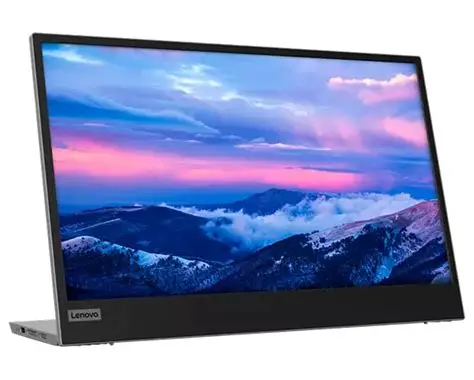
For users who are constantly on the move, engaged in some work from home, or busy studying in a crowded dormitory, the ultra-portable Lenovo L15 mobile monitor makes perfect sense. Weighing only 860 g1 with an ultra-slim 6mm head thickness and an integrated stand, the L15 is easy to carry around and fits on the corner of a multipurpose table or shelving unit. With its 15.6-inch screen, the L15 is a handy ‘second screen’ that gives you flexibility whether you are taking notes while attending online lectures or simply binge-watching your favorite content. It easily connects to Notebooks of any screen size via a USB Type-C2 cable, and power pass-through support lets you charge the PC and power the monitor simultaneously. With eye care technology to prevent eye strain and Lenovo Artery software3 to control settings, the L15 delivers an uncomplicated and delightful experience.
One Display for Everyone
The FHD 1920 x 1080 resolution makes your display experience, whether watching videos or browsing webpages, a pleasurable one. The In-Plane Switching (IPS) panel offers impressive screen clarity and wide viewing angles of up to 178°, which make for distortion free images no matter where you place it. The 3-side narrow bezels look premium and provide wider screen real-estate for optimum use, so you can view content without distractions.
Connectivity with Convenience
The L15 comes equipped with two USB Type-C2 ports, which have data, power, audio, and video transfer capabilities—a single-cable solution for your connectivity needs. The USB Type-C port supports power pass-through, up to 65W, to charge your notebook or smartphone and power the L15 simultaneously. This keeps your study corner clear of troublesome snaking cables, offering a clutter-free desk space. Exclusive Lenovo Artery software3 provides advanced and assistive tools to help you seamlessly manage and control your L15 monitor and other devices.
Stylish and Purposeful
Sleek design—enhanced by the raven black narrow bezel design—makes for wider screen space in a premium package. Ultra-slim build with height adjustment lets you carry it with ease and position the display at eye level atop a desk so you can enjoy multimedia or engage in learning anytime, anywhere. Harmful blue light emissions are reduced with the L15’s TÜV Rheinland Low Blue Light technology so users can comfortably binge content or get work done without eye strain.
OTpro Marketplace Returns and Refunds Policy
The OTpro Marketplace is a SaaS provided by Out Tasking Procurement Solutions (Pty) Ltd.
This policy aims to outline OTpro Marketplace’s role specific to Returns under the following categories:
1. Goods and or Services procured from third-party Sellers using OTpro Marketplace
Any goods and or services purchased using OTpro Marketplace constitutes a direct transaction between a Buyer and a Seller. OTpro is not party to any sale in this regard. As a SaaS provider, OTpro Marketplace supports the capability for a Buyer to log returns of Goods and or services procured via the OTpro Marketplace. In this instance, the OTpro returns policy merely serves as guide outlining the steps for a Buyer to log their returns directly with the Seller through the OTpro Marketplace. It is therefore important for the Buyer to familiarize themselves with the Sellers Return and Refund Policy conditions, prior to proceeding with any purchase. The Sellers comprehensive Return and Refund Policy conditions is available under the Sellers store profile on the Marketplace for the Buyer to view at any given time to determine the eligibility for returns.
For a Buyer to initiate a return, follow these steps:
1.1. Log into the OTpro Marketplace Portal: Access the portal using your credentials.
1.2. Click on “Orders” to navigate to the Orders section.
1.3. Click on “View” button on the order line item that you want to return.
1.4. Click “Get Support” button.
1.5. Tell details about your problem.
1.6. Click “Submit” button to submit your return request to the Seller.
1.7. Request will be submitted to the Seller successfully.
1.8. Await feedback via email.
1.9. Customer Support: You may contact OTpro customer support to assist with return requests and answer any questions should the Seller be unresponsive. OTpro customer support team will endeavour to assist by engaging the relevant parties, however is not liable to solve the query.
For a Seller to accept the return request, follow these steps:
1.10. Seller receives request notification via email.
1.11. Log into the OTpro Marketplace Portal: Access the portal using your credentials.
1.12. Navigate to the Dashboard.
1.13. Click on “Support” a list of return requests will be displayed.
1.14. Click on the ticket number to view the details.
1.15. Go to “Orders” and locate the order you want to refund.
1.16. Click “Request Refund” button.
1.17. Select the number of “Quantity” of the item you want to refund, the system will automatically calculate the amount.
1.18. Write reason for return.
1.19. Click “Submit Refund Request” to send to OTpro Admin to finalize the request.
1.20. A pop-up message to confirm refund will come up for the Seller to confirm request by clicking “Ok”.
1.21. A message will show “Refund Request Submitted”.
1.22. OTpro Admin will receive the email to approve the return request.
1.23. A notification will be sent to Seller and Buyer that the order has been Refunded.
1.24. Seller will change ticket status from “Open” to “Closed”.
2. Cancellation / Termination Access and use of OTpro Marketplace
Access and use of OTpro Marketplace is gained through registration subject to the payment of subscription ( for example, usage based fee, Set-up, customization fees) based on various fee structures by either recurring monthly or annual payment in advance or as agreed.
Should you the user require to cancel / terminate your subscription/registration and request for a refund, such request for cancellation will be in accordance with the terms and conditions outlined in our respective signed agreements and subject to the following:
2.1. Eligibility for cancellation/termination:
OTpro Marketplace has a 30-day satisfaction guarantee policy. If you are not satisfied with the service (such as dissatisfaction with the service, technical issues, or unmet expectations) within the first 30 days, you may request for a cancellation and a full refund of the subscription fee if paid in advance. Your request will be reviewed to confirm that it falls within the 30-day period and a full refund will be processed for the user. This excludes any implementation, transaction and or customization costs incurred.
2.2. Time Frame: Requests to cancel / terminate must be made within the first 30 days of registration and access to OTpro Marketplace.
2.3. Notice Period: Should the 30 day period elapse, you are required to give a 2 month notice period for cancellation before each anniversary date, failing which the subscription will auto renew.
2.4. Refund Terms: Should you be eligible for a full or partial refund, the refund will be processed via the payment method utilised during registration.
2.5. Data Protection and Privacy: Upon termination of your subscription, your account will be de-activated. Your data will be retained on the OTpro database for a six month period for historic transaction referencing.
3. Goods and or Services procured from OTpro online store
Any goods and or services purchased from OTpro online store that is located on OTpro website and or OTpro Marketplace constitutes a sale between OTpro and the Buyer. As a SaaS provider, OTpro supports the capability for a Buyer to log returns and or refunds of Goods and or services procured via the OTpro Marketplace and or OTpro website. It is therefore important for the Buyer to familiarize themselves with the Return and Refund conditions contained in each product and or service description, prior to proceeding with any purchase.
For a Buyer to initiate a return, follow these steps:
3.1. Log into the OTpro Marketplace Portal: Access the portal using your credentials.
3.2. Click on “Orders” to navigate to the Orders section.
3.3. Click on “Request Warranty” button on the order line item that you want to return.
3.4. Select the item you want to replace/refund.
3.5. Select what you want to request for from the list “Replace”, “Refund” or “Refund as store credit”.
3.6. Select the “Reason to request for warranty”.
3.7. Tell details about your problem.
3.8. Click “Submit Request” button to submit your return request to OTpro store.
3.9. Request will be submitted to OTpro store successfully.
3.10. Await feedback via email.
3.11. Customer Support: You may contact OTpro customer support to assist with return requests and answer any questions.



Reviews
There are no reviews yet.